
To use Deusbot, you need an active license.
Every license provides the same access to Deusbot and its services. The selected tier only determines the maximum base position sizes you can select in the Expert Advisor.
You can begin with a 30-day free trial or purchase a annual subscription. For paid access, choose the tier that corresponds to the capital you plan to allocate and the base position sizes you intend to use. The calculator can be used to choose an exposure preset or custom position sizes, review the corresponding historical results, and identify the lowest license tier that covers the selected setup.
This guide explains how to choose the appropriate license, complete checkout, and confirm that it is active in your membership account.
What a license covers
A license gives you access to the Expert Advisor (EA) for one trading account.
Each license tier sets the maximum base position size you can select in the EA for each supported index: S&P500, DAX40, and CAC40.
These limits apply only to the base values you configure, not directly to the final position size of each trade. For every trade, the strategy multiplies the corresponding base value by a coefficient to determine the position size used.
Choosing the right license
You can start with the 30-day free trial or purchase a paid license. In both cases, you will receive an active license that gives you access to Deusbot and its services.
Free trial
The free trial is intended for testing Deusbot before purchasing a paid license. It requires no credit card and can be seamlessly upgraded to a paid license at any time.
Paid license
Paid licenses provide the same access to Deusbot and its services as the free trial. The selected tier only determines the maximum base position sizes you can select in the Expert Advisor.
Choosing a license with the default sizing
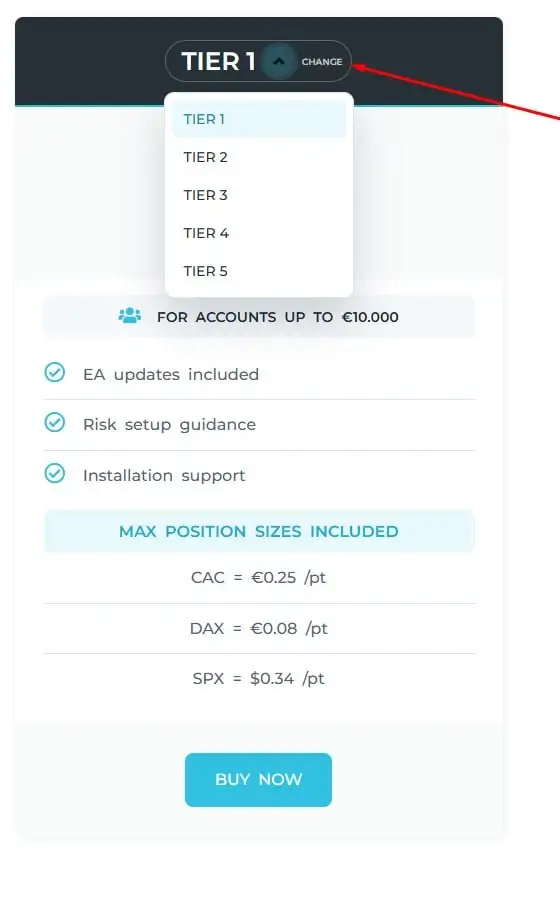
On the pricing page, choose the tier that corresponds to the capital you plan to allocate.
The displayed capital is a practical reference based on our standard position sizing. The actual license limits are the maximum base position sizes shown for CAC, DAX, and SPX.
If your planned capital is close to the upper reference for a tier, consider choosing the next tier to leave room to increase your base position sizes later without upgrading.
Choosing a license with the calculator
Use the Deusbot calculator to choose an exposure level, review the corresponding base position sizes, and identify the license that matches the selected setup.
- Enter the capital you plan to allocate in the BALANCE field.
- Choose an Exposure preset, or adjust the CAC, DAX, and SPX values per point manually.
- Check the displayed risk exposure for each index.
- Open 2 – SUMMARY to view the matching license, its annual price, the maximum sizes included, and the average annual historical result after deducting the license cost.
- Review 3 – CHART, 4 – TRADES, and 5 – PERFORMANCE, paying particular attention to the Maximum Drawdown.
- Continue only with a position sizing and level of risk you are comfortable with.
Historical Maximum Drawdown is not a guaranteed limit, and future losses or drawdowns may be higher.
If you change the CAC, DAX, or SPX value per point, the matching license may also change. This is normal: the recommendation is based on the base position sizes you intend to configure in the Expert Advisor.

Complete checkout
Once you have chosen your license, complete the checkout from the pricing page.
- For the free trial, click START TRIAL. For a paid license, select the chosen tier and click SUBSCRIBE.
- Log in to your Deusbot account, or create a free account when requested. You will need to verify your email address. If the verification email arrives in your spam or junk folder, mark it as Not spam and add the sender to your contacts or safe senders list. Deusbot may send important service notices by email, including urgent updates about temporary server downtime, so make sure these messages remain visible.
- Complete the checkout.
After the trial checkout or successful payment, Deusbot creates or updates the license automatically in the membership account used during checkout.
Confirm that the license is active
Open your membership account and check the license dashboard.
The activation code will be generated by the EA and is used to link your license to the MT4 account on which the EA will run. This step will be covered later, so you can leave this field empty for now.
Check the following information
- the free trial or paid license tier is displayed
- the license status is active
- the expiration date is displayed
- the Expert Advisor download link is available
Upgrading your license
If the capital allocated to Deusbot increases, or if you simply wish to increase the risk level of your EA, you may approach the maximum base position sizes available with your current tier. At this point, it may be advisable to upgrade your license to the next tier so that you can configure larger base position sizes in the Expert Advisor.
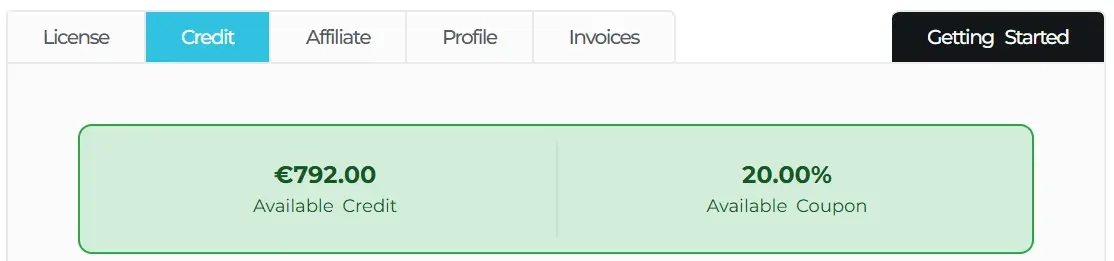
To help with this, a credit system is available. When you upgrade, the unused time on your current license is converted into credit and deducted from the price of the new license. Any coupon applied to your current license is also included in the credit calculation. This allows you to retain the value of the remaining subscription period and upgrade your license with peace of mind.
We recommend using the calculator whenever the capital allocated to Deusbot increases significantly, you wish to increase your base position sizes, or your risk preferences change. This will help you confirm whether your current license supports the base position sizes in the setup you intend to use.
Your license is ready
Your free trial or paid license should now be active and visible in your membership account. You do not need an activation code yet; it will be generated later when Deusbot is installed in MetaTrader 4.